How to subscribe to a plan
This tutorial shows you how to choose and subscribe to a CueWee plan, Starter or Pro.
Before you start
- You need an account. If you don't have one yet, go to studio.cuewee.app and create yours. Every new account gets 5 free songs.
- Payment is handled by Stripe. You can pay by credit card in R$ (BRL), US$ (USD), or € (EUR). In Brazil you can also pay with PIX or Boleto.
Step by step
1. Open the Plans page
Sign in to the app and click Plans at the top of the screen (or open studio.cuewee.app/subscription directly).
At the top you'll see a bar with your current plan, the renewal date, and a Manage Subscription shortcut (update card, cancel, and more).
On the mobile apps, the plans page opens in your device's system browser.
2. Choose monthly or yearly
Above the plan cards there is a Monthly / Yearly switch. Yearly covers twelve months with 2 months free applied automatically, so the cards show the full yearly price struck through above what you actually pay. Nothing to type, the discount is already applied.
You can change cadence later from this same page. See Billing cadence.
3. Compare the plans
The two plans appear side by side:
- Starter: the 5 base instruments, and up to 200 songs a month, under the Fair Use Policy.
- Pro: all instruments, sharing with up to 20 members, Extend Stems, and up to 500 songs a month, under the Fair Use Policy.
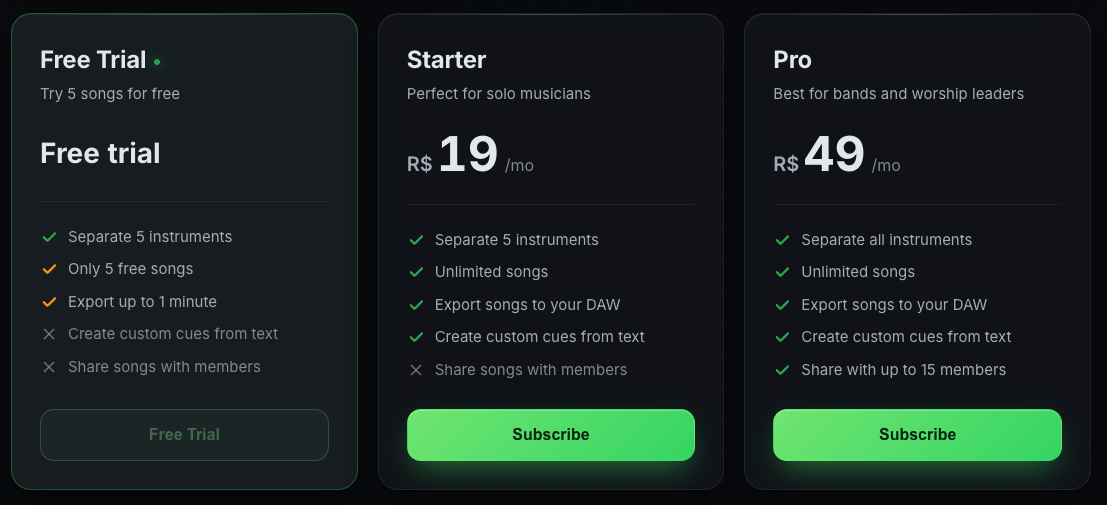
Each card shows the price in your local currency and the feature list with ✓ (included) or ✗ (not included). See full details in Plans and usage.
4. Click "Change Plan"
On the card of the plan you want, click Change Plan (or Choose Plan if this is your first subscription). The checkout panel opens to the side, with the plan summary and the payment form.
5. Choose how to pay
Pick your payment method:
- Credit card: enter the name on the card, the card number, expiration date, and CVV.
- PIX (Brazil): scan the QR code or copy the PIX code and pay in your bank app. The code expires after a while, and you can generate a new one. Requires a CPF or CNPJ.
- Boleto (Brazil): generate the bank slip and pay it. It can take 1 to 3 business days to clear. Requires a CPF or CNPJ and a Brazilian address.
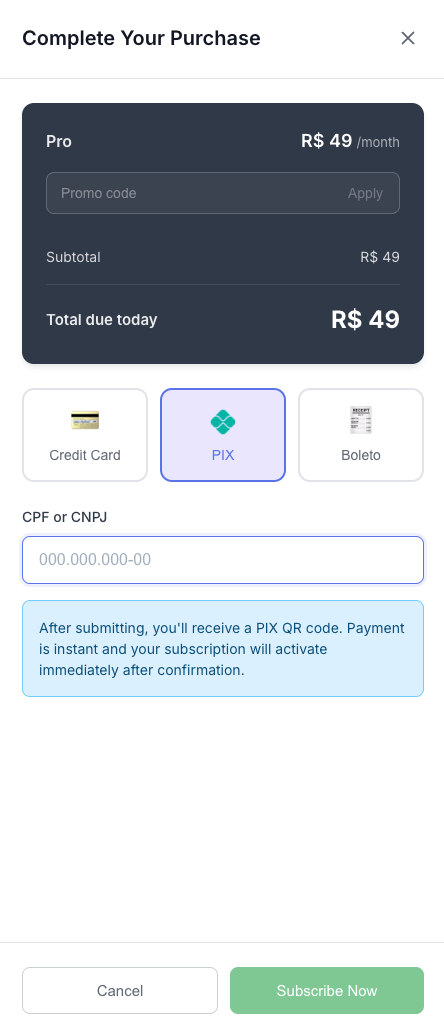
Check the price and confirm the payment.
6. Confirmation
After payment is approved, the status bar at the top updates automatically:
- The badge switches to Active
- The new plan name is shown
For PIX and Boleto, your plan activates once the payment clears. You can now start processing songs on your new plan.
Change or cancel later
You can return to the Plans page any time:
- Upgrade (Starter to Pro): click Change Plan on the Pro card. The difference is charged proportionally and takes effect immediately.
- Downgrade (Pro to Starter): click Change Plan on the Starter card. The change takes effect at the next cycle.
- Switch monthly and yearly: flip the switch above the cards, then click Change Plan on the plan you want. Moving to yearly takes effect immediately with credit for the time you already paid for. Moving back to monthly takes effect at the end of the year you already paid for.
- Cancel: click Manage Subscription, then Cancel. Your subscription stays active until the end of the current cycle.
See the full policy in Terms of Service §5.5.
Payment problems?
- Check that your card has available credit and is enabled for international purchases (if you're paying in USD or EUR).
- If the charge fails, you'll receive an email and the app will show a notice. Access may be suspended until you bring payment up to date.
- If you need help, write to contact@cuewee.app before opening a dispute with your bank, so we can resolve it faster.