Chords, key, and tempo detection
Every song you process is analyzed automatically. CueWee detects the tempo, the key, the time signature, and the chord progression, and shows them in the player.
What CueWee detects
- BPM (tempo): the song's tempo, including tempo changes across the song.
- Key: the musical key, shown in the player (for example "C maj").
- Time signature: the meter, such as 4/4 or 3/4.
- Chords: the chord progression, shown as a chord track along the timeline.
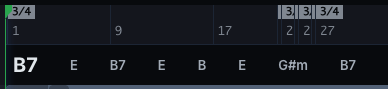
The chord track
The chord track shows each chord where it lands in the song. For each chord, CueWee estimates the most likely chord, and it may show the bass note and alternatives when it is less certain.
Using detection while you rehearse
- Follow the chords in real time as the song plays.
- Change the key with the pitch control to fit your singer. See How to use the music player.
- Adjust the tempo and time signature. See How to edit tempo.
Detection is automatic and highly accurate, but not perfect. You can fine tune tempo and sections after processing.