How to share with friends
The Pro plan lets you share your processed songs and playlists with other people. This is great for bands, worship leaders, and music directors who need to distribute the repertoire to their musicians.
Limits per plan
| Plan | Sharing |
|---|---|
| Trial | Not available |
| Starter | Not available |
| Pro | Up to 20 members per song or playlist |
Whoever receives the share does not need a subscription to view and play the shared content.
Who can share
- Only the owner (whoever did the processing)
- Only songs that have finished processing
Step by step
1. Open the song
Open the song in the player.
2. Click "Share Song"
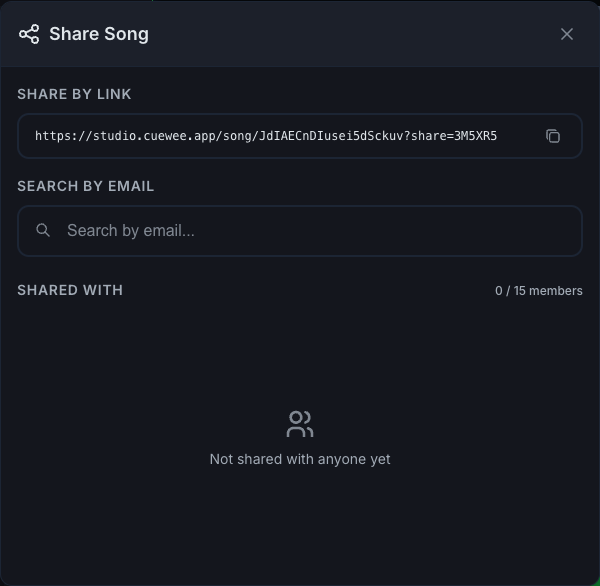
The button sits at the top of the player, and only the owner sees it. The Share Song window opens.
3. Use the shareable link
At the top of the window there is a private link to the song. Click Copy shareable link and paste it into WhatsApp, email, or wherever you want.
Whoever opens the link needs to be signed in to CueWee. If they do not have an account, they are invited to create one for free.
4. Add users by email
Below the link there is a search field:
- Type the email of the person you want to add
- CueWee searches for registered users with that email
- Suggestions appear with the person’s picture, name, and email
- Click the user to add them
If the email returns no results, you'll see "No users found." In that case, ask the person to first create an account at studio.cuewee.app.
5. "Shared with" list
This section shows who already has access, with:
- The picture and name of each person
- A counter showing how many people you have shared with and how many your plan allows
- An X button to remove access
If you reach your plan limit, you'll see the message:
"You've reached the maximum number of shared members for your plan"
With a link to Upgrade if you are not on Pro yet.
What the recipient can do
Whoever receives the share (by link or by email):
- ✅ View the song
- ✅ Play it (play, mute, solo, adjust volume and pan locally)
- ✅ Export it (if the owner allows it)
- ❌ Edit sections, cues, or tempo
- ❌ Share it with others
Key and BPM when sharing
The behavior depends on whether you share an individual song or a playlist:
- When you share a song by itself, each person chooses their preferred key in their own player. That choice applies to that person’s audio, lyrics, and guides.
- When you add the song to a shared playlist, the key and BPM are saved in the playlist. Everyone with access to the playlist uses those same values.
Revoke access
At any time, the owner can:
- Remove users one by one by clicking the X in the list
- Reopen the Share Song window and manage who has access
Whoever had access will see a No access message when they try to open the song.
Sharing playlists
You can also share a whole playlist the same way. Open the playlist, click Share, and use the link or add people by email. The same 20 member limit applies.
Common errors
- "No users found": the email has no CueWee account. Ask them to create one.
- "You've reached the maximum number": remove someone, or upgrade to Pro.
- Share button does not appear: you are not the owner, or the song is still being processed.