Apps and platforms
CueWee runs everywhere your team does: in the browser, on macOS and Windows, and on iOS and Android.
Web
Open studio.cuewee.app in any modern browser, on desktop or mobile. Nothing to install.
Desktop (macOS and Windows)
Download the desktop app from www.cuewee.app/download. It is a direct download from our site, not from the Mac App Store or the Microsoft Store. The page detects your system and offers the right build:
- macOS 11 Big Sur or later. One download runs natively on Apple Silicon and on Intel Macs.
- Windows 10 or later, 64 bit.
Both versions install updates by themselves in the background, so you stay on the current build without downloading it again.
The desktop app adds pro audio features on top of everything in the web app:
- Choose your output device and sample rate.
- Route each stem to a specific channel pair on multi output interfaces (for example RME or Focusrite), so you can send click, guide, and each instrument to separate outputs. Open the Audio Output Device settings to set this up.
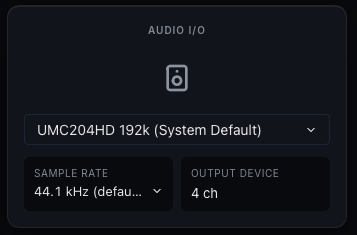
Full walkthrough: Audio routing on desktop.
Installing on Windows
The Windows installer is not signed yet, so on the first install Windows may show a Windows protected your PC warning from SmartScreen, or name an unknown publisher. Click More info, then Run anyway. The certificate is on the way, and the warning disappears once it is in place.
Sample rates on Windows
Windows plays every app through its shared audio engine, which resamples everything to the rate configured for the device. CueWee only offers rates up to that one, because asking for a higher rate would just add a second resample. To run at a different rate, change it in the Windows sound settings for the device (Sound settings, then the device's Properties, then Advanced), and CueWee follows it.
Sign in to the desktop app
When you open the desktop app, it asks you to sign in through your browser. Follow the prompt to sign in at studio.cuewee.app, then return to the app.
Mobile (iOS and Android)
Download CueWee from the Apple App Store or Google Play. The mobile apps keep working offline once songs are loaded, and they update themselves in the background.
The bottom bar has three tabs: Library, Playlists, and Preferences, where your account, sign-in methods, storage, and language live. The icon at the top left of the Library and Playlists screens opens the side menu, with upload, shortcuts, and the rest.
On these apps you can also set how much space the audio cache is allowed to use. See Offline playback and cache.
On the mobile apps, subscriptions are managed through your device's system browser. Tap Manage Subscription and CueWee opens the plans page in your browser.